Step 1
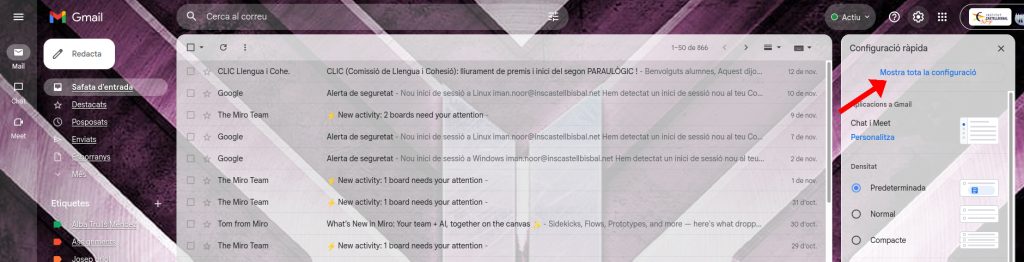
Open Settings
Open Gmail than click on the “setting icon”.
Step 2
View All Settings
Than click on the “see all the setting”.
Step 3
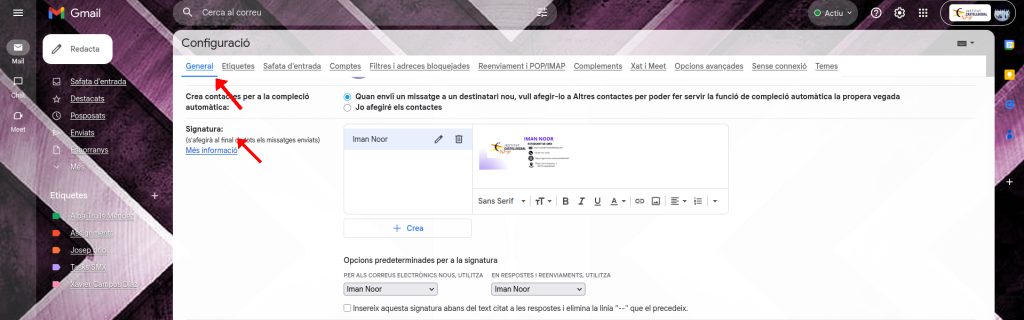
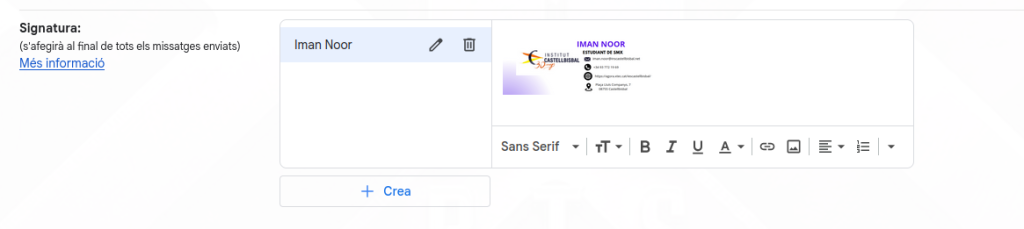
Add Signature
And than you scroll down and there you can see written signature, first enter your name and after that put you logo.
Design Process
PHASE 01
Canvas Setup
- Chosen a professional email signature template.
- Added the logo of Institut Castellbisbal.
- Wrote my full name (“IMAN NOOR”).
PHASE 02
Identity & Contact
- Added my position or role (“SMX Student”).
- Included my institutional email address.
- Added phone number and school website link.
PHASE 03
Finalization
- Wrote the address of the institute.
- Exported the final design as a PNG image.
Designed using Canva for high-quality digital output.